It’s hard to gauge someone’s entire financial picture with only five questions, but I picked out the ones that I thought are most revealing about how someone is doing financially and put together a 2-minute quiz here:
Investing and saving tips get a lot of play in the financial advice columns, but the most fundamental step in building wealth is figuring out where your money is going.
First, jot down all the ways that money comes out of your accounts & pockets. This means any bills that come straicapight out of your checking/savings accounts, any credit and debit cards you use, and any cash you pull out of the ATM, or cash that you receive as gifts or income and then spend.
My wife & I keep a joint account for shared expenses as well as our own individual accounts, so I’ll share with you my half of the joint expenses + my solo expenditures.
Here are all of the ways money flows out of my accounts:
Bills that get paid individually straight from my checking account, which includes our mortgage & property taxes, as well as some city utilities, and the handful of checks I write each year. I try to use automatic, electronic billing direct from my checking or credit cards for everything, and Venmo/Paypal/bank transfer for payments to individuals, so I almost never have to write a check.
PayPal and Venmo, which both pull from my checking account
Cash: I use the highly-recommended no-ATM fee Schwab Investor checking to spend cash from an ATM or debit card.
Now let’s figure out how much I spent in total from those accounts and what the specific bills were for. (We’ll breakdown the credit card payments later.)
Hopefully your bank has all your transactions online, so all you gotta do is download them and take a look. It’s easiest to dump everything into a spreadsheet, and I recommend doing that if this is the first time you’re doing this. If you can’t be bothered, at least glance at the past couple of months of statements and jot down some rough numbers that accurately reflect your monthly averages.
I bank with, and highly recommend, this bank, so let’s login over there and see what I spent in total for the past 12 months.
Above: my bank has a handy ‘Download Transactions’ widget where I can download everything as a CSV so that I can open it in Excel or Google Sheets.
Above: I’ll grab a year’s worth of data and export it as a CSV.
Above: Here’s what the CSV file looks like in Excel.
My bank reported my spending as debits (money paid out) and credits (money coming in.) For now, we only care about spending, so use your spreadsheet program to just filter on ‘Debits’. (Add back any Credits/reversals of charges that represent cancellations/returns.)
Next, filter out any transfers (which also show up as Debits) that just go to your other savings or investment accounts. We only care about money leaving your financial ecosystem for good, not any ‘internal’ transfers. When you’re done filtering, you should only see actual expenses being paid out to others.
Exclude any tax payments, since those are not directly under your control.
After this filtering, I added up the numbers and bucketed them into useful categories:
This tells me I spent about $35,000 last year, which sounds about right since I budget $3,000 per month for myself. This is a great start, but now I need to break out the line items for my credit cards.
Your credit card company should also let you download a CSV of your transactions. Both Chase and Capital One let you download a custom date range of at least 1 year, and they both helpfully provide spending Categories that you can use as-is, or tweak to better reflect your purchases. They also give you an ‘annual report’ each January with some mediocre category matching which you could also use vs doing it in a spreadsheet.
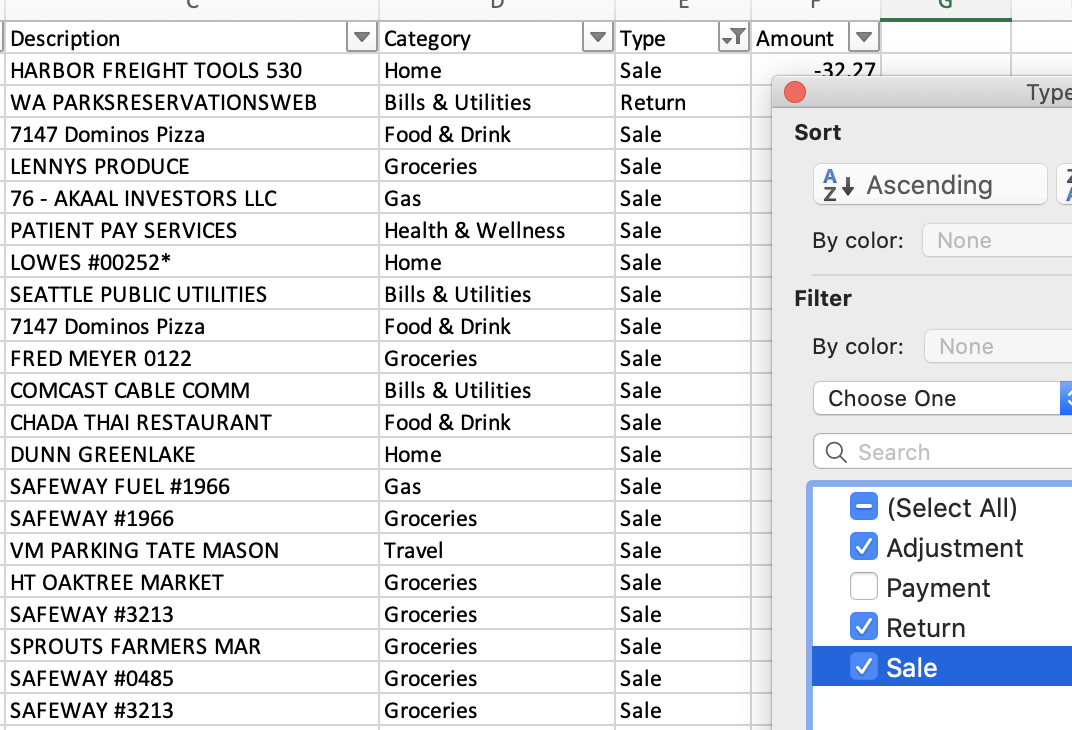
Here’s my joint Chase card’s transactions where I used the Category column to filter out my Payments to the card (keep Adjustments, which for me are cash back rewards, and Returns, since you should net those out against the Sales.)
For my Capital One card, I needed to use the Description column to filter out the my automatic payments.
I also filtered out certain expenses that my work reimburses me for like work travel and parking at the office, since there’s no net out-of-pocket cost to me for those things.
To make the categorization and accurate as possible, I went through everything and changed some of the Categories (switching Costco & Walmart from ‘Shopping’ to ‘Groceries’, for example.)
Then, I used Excel’s pivot table functionality (or Google Sheets) to sum things up using the Categories that each credit card company provided (after I edited them):
Above: my filtered solo expenses (left) and our joint expenses (right. I only pay half of these.)
Lastly, I used these two tables to combine my two credit cards into a handful of big buckets of my own choosing to get a clearer picture of everything together. I divided our joint expenses by 2 to get ‘my’ portion of the expenditure:
Above: the Holy Grail: my yearly expenses all in one table and with accurate categorization + a few notes in the ‘Expense Name’ to remind me what’s in each category and to call out any big purchases.
The takeaways:
Housing + home maintenance is by far my biggest expense (54% – $1,550/month)
I spent over half of my ~$3,000/month budget on housing. Nearly 1/3 of that is just going to utilities + property taxes, and the remaining 2/3s to the mortgage. I spent an additional 3% on home maintenance stuff, which included needing to buy a refrigerator ($900) when we moved in and also paying a plumber to unclog our sewer pipe a few months after living here ($800!), as well as tools & supplies from the hardware store.
Travel and going out is my biggest discretionary expense (22% – $615/mo.)
Travel was 12% ($335/mo.) We took a trip to Portugal for about $3,300 for the 2 of us for 12 days. We also visited my wife’s family in New Jersey. I had a bachelor party in Vegas that I was co-host for. Lodging for local weekend trips is also in here.
Coming in at 10% was eating/going out ($280/mo.) This also included miscellaneous cash expenses for activities like the State Fair, date nights, and weekend trips or local activities. Going out for drinks is also in here. (Some of this cash probably went to buying used furniture and tools for our home, but I didn’t try too hard to separate that out.)
Food & home products (12% – $335/mo.)
We cook the vast majority of our meals at home, and I spent about 7% of my budget on groceries ($400/month for the two of us.) This is lower than it normally would be because I ate a lot of my meals for free at work this past year.
About 5% of my budget was for ‘household shopping’, which included everything I buy off Amazon, as well as from big box stores like Target. I’ve been getting into hosting themed events like my inaugural basement haunted house that I put on last year for the neighborhood, so props and other things that feed my hobbies are in this bucket too.
Medical was a big expense this year because we’re having a baby (6% – $170/mo.)
We paid higher-than-usual medical expenses in preparation for having a child. We thankfully have insurance which covers most of this.
We’ve saved a good deal in our HSAs, which allowed us to pay these out-of-pocket expenses with tax-free savings & investment growth from prior years, so it wasn’t quite as painful.
Owning and driving a car (4% – $120/mo.)
Gas (about $75/month for me) + auto insurance ($380/year for my half of it) and other miscellaneous expenses ($164 for annual registration, motor oil, air filters, a new regulator to fix my automatic window) for my car ended up costing me about $120/month. My wife and I drive older cars from 2001 and 2002 respectively, so we have no car payments (a key pillar of building wealth.) I try to do most of our car maintenance and simpler repairs myself, so this is about as bare bones as it gets for dual car ownership.
I starting saving $100/month last year for a future replacement car since mine hit 200,000 miles in late 2019. Hopefully by the time it dies I’ll have enough to offset the purchase of another reliable used car.
Phone, entertainment, and home internet (3% – $83/mo.)
My cell service is inexpensive at $30/year from highly-recommended Consumer Cellular. I bought a new Moto G7 phone for $177 including tax + a protective case. It’s a ‘budget’ phone compared to Apple or a Samsung Galaxy, but as far as Android devices go I much prefer the Moto G line to the Samsung Galaxy that I use through my work.
I keep my data usage low by always leaving on the ‘data saver’ Android option, and also by connecting to wifi whenever possible like at work or home. Xfinity/Comcast, whom we use for our home internet, has a nice network of mobile hotspots that you can connect to when you’re on the go. I use wireless calling or apps like What’sApp or Google’s Duo when connected to WiFi to keep my plan minutes low to save a few bucks, but unlimited calling is cheap with Consumer Cellular too.
We had a 12 month promotion for $30/month for Comcast internet. It was set to go up to $69, but I negotiated them back down to $35 for this year. I do this every year which saves me over $300 annually with one or two quick phone or online chats to Xfinity.
For entertainment, we mooch off generous friends and family for streaming servicesincluding Netflix, Spotify, Hulu, and Disney+ and pay absolutely nothing for them. (God bless those friends & family.) We use the library and archive.org heavily for more free streaming video, downloadable audiobooks, and ebooks.
My one subscription extravagance is a Seattle Times Sunday paper delivery + digital subscription that now costs $5/week. I was on a promo deal for most of 2019, but I’ve decided to suck it up and pay the full price going forward to support local journalism.
Great job assembling all your data! Now it’s up to you to decide where to spend more or less.
Whew! It took some web & spreadsheet work, but now I have a detailed picture of where all my money is going. If I was looking to trim some expenses, I could take a hard look at several places and decide what to cut. On the other hand, maybe I’m taking fewer trips or date nights than I think is ideal, and I might decide to spend more in those areas, perhaps cutting something else to pay for it.
Seeing the big picture of your spending
Going through this exercise drives home the fact that if I wanted to reduce my current budget in a significant way, it would be hard to do so unless we moved to a cheaper place since housing by itself is already 54% of my budget.
We’re pretty good at keeping our utilities & insurance costs low, and we just refinanced to lower our mortgage bill by $140/month, so there’s nothing left to do except sell the house and move to a cheaper area if we wanted to save more on our mortgage + property taxes. (We have no such plans: we’ve consciously made the cost tradeoff to live close to our friends & jobs and be in the city for now, but maybe years down the road we’ll change our minds in order to, say, facilitate earlier retirement, or provide better public schooling for our children, or just get more house/land for our buck.
Travel & going out is our next biggest expense, but honestly, I would spend more time on travel & outings if we could. Having novel experiences, investing in productive hobbies, and making memories is probably the best way we spend our time and money. Of course, we could prioritize cheaper trips like camping & local excursions vs expensive ones like European travel, but again, we’ve consciously set aside a certain amount of our budget for these more extravagant adventures. (And we do look for discounted airfare, good hotel deals, and reasonably-priced dining and transit to get the most memorable fun for our buck.)
We’ve already set up our budget to balance comfort & experiences vs savings in a way that meets both of our needs, and we aggressively max out our tax-advantaged savings while also setting aside more savings for early retirement, so I won’t be making any major tweaks today.
That’s all well and good for me, but if you haven’t done this kind of exercise before, spend some time deciding how you might like to shift where your money is going.
This exercise is about consciously spending & saving to get the most out of life. It’s up to you to determine what that means.
What next?
Congratulations! You just did the hardest part of personal finance: figuring out where your money is going. After you’ve made some decisions on how you might change you spending & savings picture, automate your banking & budgeting with my bulletproof spending & saving system.
Happy spending!
Addendum
The Approximate Method – Pen & Paper
If you don’t want to spend the time to get detailed info and use a spreadsheet, just jot down the numbers on a piece of paper, using the info you find online to help. I found this to be MUCH more painful than using a spreadsheet. If you go this route, I’d recommend trying to focus on the big picture:get down your total spending accurately, and then just fill in the detail as best you can, starting with the biggest spending chunks.
First, I looked through the past few months of bank statements and jotted down all the payments I made from there, excluding my credit card payments which I’ll look at separately.
For your credit cards, I recommend just grabbing your most recent year-end statement and basing your estimates off that (adjusting for any big changes that might make your current spending a lot different.) Both Chase and Capital One provide nice breakdowns by month and by category, so use those to estimate the details of where your money is going. Investigate anything that represents a large chunk of money or is confusing to you (i.e.: you’re not sure what that spending represents.)
Below: Example of Capital One’s Year-end summary that you can use to quickly categorize your credit card spending
Use two pieces of paper at this point: one for the gory details as you parse through your bank statements + credit card summary, and a second one to categorize the numbers into a handful of buckets & add them up (far-right.)
Add up everything in your ‘buckets’ sheet of paper and make sure the total is roughly accurate, and you’re done! Go back up to the end of the spreadsheet method to see the next steps.
1. Increase your 401k contribution to 20% (ideally), or at least 10%, or max it out at $19,500 (2020 limit) if you can. Stocks have gotten a lot cheaper, so load up!
Because you’ll save taxes, your take-home pay won’t decrease by nearly that much, and you can also reverse this later if you feel like it’s too much.
2. Review your current investments: I recommend keeping things simple and using only two investment choices for short or long-term savings.
3. Beneficiaries checkup
While you’re reviewing your investments, make sure the beneficiaries on your retirement, and any other investment accounts, are updated. (Usually under ‘my profile/Account Maintenance’ or some such title.)
Simplify your financial life
4. Consolidate your financial accounts into one place: roll over any former employer retirement plans like 401ks/403bs into an IRA. I recommend Vanguard for their low-cost investment options, but Fidelity is also fine.
If you happen to have non-employer investment accounts like any Roth/Traditional IRAs, or just plain ‘ol taxable investment accounts, roll those over too.
5. If you have any old Health Savings Accounts (HSAs), consider rolling them over to no-fee + great investment choices at Lively.
Most importantly, DON’T PANIC! If you don’t need cash, no need to sell any stocks (I’ve been buying more as the market has declined with bonds & cash that I don’t need within the next 3-5 years.)
Set up a spending plan. Never budget again. Build wealth automatically.
I’ve been using a personal finance system for years now that allows me to know exactly how much I spend (and on what), pay all of my bills on time with zero effort, and save and invest a large portion of my income. All of this takes me less than 15 minutes a week to manage, which I do entirely from my smartphone. It’s simple and powerful, and can be set up in less than an hour or two.
On the back of a napkin, or if you’re so inclined, on a spreadsheet, add up how much you spend each month on fixed expenses, things that are predictable and must be paid, and discretionary expenses, things that can vary a lot and can be delayed or changed when needed. Ignore expenses that come straight out of your paycheck like income taxes and health insurance, and don’t count any investing like 401k or IRA contributions.
Exact numbers aren’t needed. Overestimate your expenses since you’ll probably forget a few things, and it’s better to guess too high than too low. Take a maximum of 15 minutes to do this right now for yourself or your family. You can go back later and make it more accurate.
Look at your online bank and credit card statements, especially year-end summaries, to quickly get an accurate estimate of your spending over the past year (including seasonal spending like winter holiday shopping and summer vacations.)
You should also include short-term savings goals such as a future Wedding, New Car, or House Downpayment, for things you expect to purchase within the next 1 – 2 years. Jot down amounts you need to budget per month for those too. (Longer-term savings goals like Retirement will be handled separately.)
A frugal single person who rents in a big city might have a budget like this:
Do this even if you’re not ready to start the system yet. It’s free, you don’t have to deposit anything until you’re ready, and will only take a few minutes. Doing this now will make you more likely to complete the system later.
Create a Checking account first where you’ll pay ALL your bills from.
Next, create one Savings account or ‘bucket’ (Ally bank term) for each of the ‘Discretionary’ categories sketched out in your budget that. If there are some categories that you don’t care about tracking individually, lump them back in with your Fixed list. I keep a separate Travel account, one for Household/Hobby items, and a few others. Limit yourself to 3 – 5 categories for simplicity. Make sure to give a nickname to each account to describe it (e.g.: ‘Travel’.)
Finally, create one more Savings account and label it ‘Short term Savings’. This will be where all of your income above your monthly spending (Fixed + Discretionary) will go when we’re all done. For example, if your take-home pay is $4,000 per month, and your expenses are $3,000, that extra $1,000 will be put into ‘Short term Savings’ for you to invest later.
To protect yourself from accidentally overdrafting your Checking account, click your Checking account, then click ‘Account Services & Settings’ and ‘Overdraft Settings’. Choose ‘Free Savings Transfer’ and choose your ‘Short term Savings’ account. This will allow Capital One to automatically pull any money in your Short-term Savings account into your Checking if don’t have enough in there to pay your bills. If this should happen, you need to ‘refund’ yourself by moving money back into your Short-term Savings account from either your Checking or discretionary Savings account to replace the overdraft.
Make sure to choose ‘Free Savings Transfer’:
Step Three – Redirect your direct deposit from work to your new Checking and Short-term Savings accounts
You’re doing great! Keep going and don’t get bogged down by the one-time annoyance of these last, crucial steps. If your employer offers direct deposit of your paycheck into your bank account (most do), set it up/change it so that your monthly Fixed + Discretionary amount is going straight into your 360 Checking account. See the FAQ below if you aren’t able to do this.
In our $3,000/month example, if you get paid monthly, then set your direct deposit to put $3,000 per paycheck into your Checking, with the remaining balance going into your Short term Savings. If you get paid twice per month (semi-monthly), divide by two and deposit $1,500/paycheck into Checking. For biweekly/once every two weeks, multiply your monthly amount by 12/26 (ex: $3,000 * 12/26 = $1,385 per paycheck.)
(If you haven’t already, make sure to set up pre-tax contributions to your company’s 401k with at least 10%-20% of your paycheck up to an IRS-maximum of $18,500/year (for 2018), or at a bare minimum, enough to collect any employer matching that you might be eligible for. If you use an HSA, you should also schedule automatic contributions to come straight out of your paycheck via your employer.)
Alternate approach: If you’re not ready yet to switch all your bills and your whole paycheck to your Capital One Checking, you can just transfer enough to divvy up into your Capital One Savings accounts, and keep using your old bank’s checking for bill pay + fixed expenses. Some people do this indefinitely, and just use Capital One for the sub-savings accounts, but I think it’s worth ‘ripping the band-aid off’ and switching everything to Capital One. If you go this route, you’ll obviously skip Step 5, which is redirecting your bills to pull from Capital One.
Step Four – Set up automated transfers from your Checking into your Discretionary Savings accounts
From Capital One 360 (edit: I use and recommend Ally Bank now, but the idea is the same!), click any account, then click ‘Transfer Money’ (top-right), and set up your ‘Monthly’ budgeted amount for the 5th of each month to go into one of your Discretionary category accounts (ex: $300 for Travel.) Do this for each of the accounts you created earlier. Make sure to first fund the account with a months’ worth of money, or schedule the transfer far enough out to give time for your direct deposit to occur.
The idea behind this is that from now on you’ll first check to make sure you have enough money in that discretionary account before you spend it. After you spend the money, you’ll transfer the amount spent into your Checking account (or wherever the bill will get paid from.) Let’s say I want to buy a new couch that will cost $400. I first make sure that I have at least that much in my Household saving account, then I buy the couch with a credit card that auto-pays from my Checking account. Immediately afterward, I transfer the $400 from my Household account into my Checking, so that when my credit card bill comes due my Checking has enough in there to pay the added couch expense.
Step Five – Redirect your credit cards, payment accounts, and other bills to all get paid automatically out of your checking account
Now that you’ve set up all your accounts and recurring transfers and deposits, set up autopay on any credit cards or other bills that you have to come from your new 360 Checking account, preferably on the 3rd of the month, if you have a choice. Make sure to also make your 360 Checking account the default choice for any payment services you use like Paypal/Ebay, Venmo and Apple or Android Pay.
I try to pay all my fixed expenses with one credit card for simplicity, or I use automated bank transfers for public utilities and online rent payments. (You can also get cash from your 360 Checking with no fees from any Allpoint ATM, and can request physical checks too from Capital One.) Go through every utility and service provider that you get a bill from and set up autopay, opting in to paperless emailed statements as well, including your landlord or mortgage company.
Even rent payments to old-fashioned landlords that require checks can be automated since good online banks allow you to schedule mailing a physical check using their bill pay.
You can also use a special credit card to pay for one specific discretionary category, and then set up that card to autopay straight from that Savings account. I use a ‘No Foreign Transaction Fee’ credit card specifically for travel, but use a different no-fee cash rewards card for all my other expenses.
Congratulations, you’ve finished the one-time setup and are ready to use your new financial system!
Step Six – Ongoing maintenance: transferring discretionary payments
Anytime you want to spend money that falls into one of your discretionary categories, 1) check to make sure you have that much in your corresponding Savings account, then 2) once you make the purchase, immediately transfer the spent amount from the corresponding Savings account into your Checking account where the bill will get paid from. I use the Capital One 360 mobile app.
This is the one manual step that you must do to stay on budget. Get in the habit, and it becomes second nature. You can also juggle money between discretionary accounts as needed. The only Iron Rule is to stick to your total spending goal of Fixed + Discretionary.
For frequent discretionary expenses like going out & eating out, use another checking account that you fund monthly just like a sub-savings account, and use only cash and a separate debit card to pay for those expenses. That way there’s no annoyingly frequent money transfers that you have to make every time you go out for a bite or to drink.
If you find that your estimates weren’t quite right, and you want to adjust how much you spend in different categories, or need more or less to be deposited into your 360 Checking each month, just tweak the steps above. The goal here isn’t to deprive yourself of spending money on things you love, or to meet someone else’s standards of what you “should” spend money on. Instead, you set your own spending priorities in a way that will keep you ‘honest’ on them, while allowing you to spend every dime that you’ve allocated for yourself guilt-free.
Step Seven – Ongoing maintenance: investing the Short-term savings for the long-term
Periodically invest all of that money that will be piling up in your Short-term Savings account now that you effortlessly spend exactly how much you want to each month. Log into your investment account (or open one) and link you Short-term Savings account to it.
Whenever I notice that a few thousand bucks have accumulated into my 360 Short-term saving account, I log into my Vanguard investment account and transfer it into my Target Retirement Fund. Choose a Target fund with a year that is 15 years after your planned retirement date. E.g.: if you’re 30 and plan to retire at age 62 in 2050, choose the 2065 option. Fidelity and other money managers also have these funds, but make sure you’re paying low fees (less than 0.2% is ideal.)
Your system with investing will now look like this:
There you have it. In just a couple of hours you’ve completely changed your financial life so that you know exactly how much you’re spending each month (without any ongoing budgeting), and have put yourself on the path to saving for financial independence.
Closing Thoughts
Each year, or whenever you have big money changes (have kids, buy a house, get married, change jobs), you can review your plan and adjust as needed, but try to set something that you’ll stick with for a long time. For me, sticking to my original budget that I set for myself 6 years ago has become a nerdy financial challenge that’s allowed me save more and more as my income has increased because my spending remains constant. (But I’m definitely not depriving myself; nor should you! There’s still plenty of room in my personal budget for my hobbies, trips overseas, whiskey, and nights out with the lady or friends. Instead, the budget forces me to build DIY skills and prioritize what’s most important in my life.)
Recommended optimizations – Get cash with no ATM fees anywhere in the world
Whew… We’ve covered a lot of ground, but there’s one more item I recommend doing. As I mentioned in Step 6, if you use cash or have a frequently-occurring discretionary category like eating out, set up a Charles Schwab Investor Checking account. You can then use that checking account to withdraw money from anywhere in the world and Schwab will refund your ATM fees at the end of each month. You’ll get a Schwab brokerage account created for you too, but there’s no obligation to fund or use it. (I don’t use mine, and I’ve had the account open for years with no problems.)
I like to use cash as my going out/eating out/fun money so that I don’t have to worry about transferring money to my Checking every time. There’s also something about physically seeing the ‘pocket money’ I have for the month that helps me mentally plan out what I can spend. To make this easy, I add one more direct deposit that sends cash to my Schwab checking account. For our $3,000 example, let’s say our Single Person wants to use $250/month in cash to pay for Going/Eating Out. Instead of creating a Capital One 360 Savings account for that, their direct deposit will send $250 straight to Schwab from the paycheck, and only $2,750 to their 360 Checking, with the balance still going to Short-term Saving as before.
Now, they just use their Schwab ATM card whenever they need cash (and will get a ‘hard-decline’ by default if they run out, which is free, but could be embarrassing if you’re using the card as a debit in a public setting :). Just use your credit card as a fall-back and transfer money later if this happens!)
FAQ
Q: What if my employer doesn’t offer direct deposit / they don’t allow me to specify a fixed amount to go to one account and the balance to go to another / I’m self-employed?
A: Just deposit your whole paycheck into your 360 Short-term Savings account. Then, within Capital One, click any account, click ‘Transfer Money’, and schedule a monthly transfer of your monthly budget amount (ex: $3,000) at the beginning of the month from your Short-term Savings to your 360 Checking account:
Q: Do I have to use Capital One 360 for this system to work?
A: Ally Bank will work for this system too. Whichever bank you choose must let you create multiple savings accounts for free with no minimums, AND schedule recurring automated transfers between accounts. Feel free to suggest other banks that meet these requirements and that you have personally used in the comments.
Q: Why schedule the transfer for the 5th of the month?
A: Scheduling for the 5th of the month will help group all your monthly bills together, ensure that any end/1st of the month paychecks have time to hit your account beforehand, and that 1st of the month bills like rent get paid first. You should also set up your credit card(s) and, if possible, other bills to be paid around the 3rd or 4th, just prior to these transfers.
The idea is to prioritize your spending in case you ever fall short: rent 1st, then utilities (if not paid by your credit card), then your credit card(s), then your discretionary transfers.