
*** I am not an accountant/CPA. This guide is general information from other primary sources combined with my understanding of IRS & tax software rules. Please consult your own accountant or IRS/tax software sources for your individual tax situation. ***
How to amend your tax return in Turbo Tax
This link had the best instructions I could find. Even though it says it’s for California tax amendments, it works for Federal/other states as well.
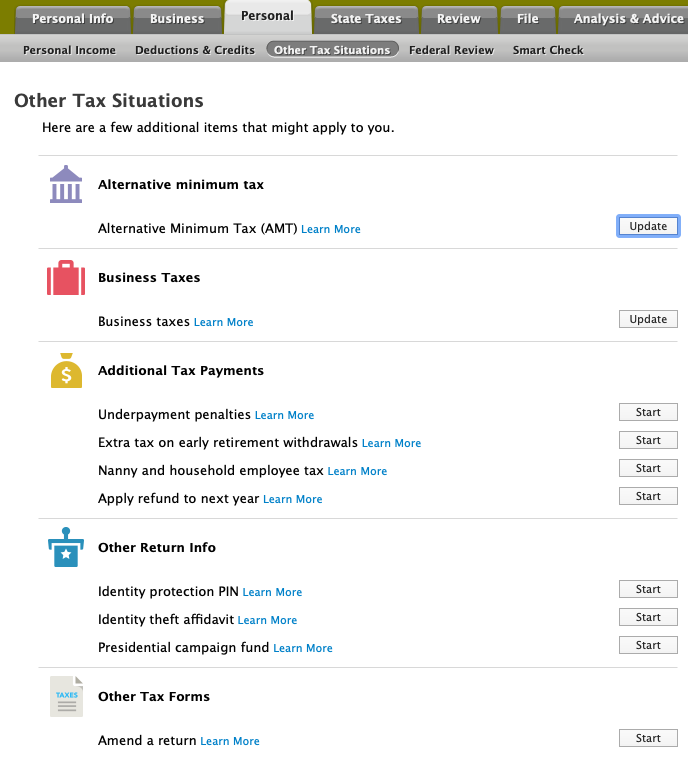
In Turbotax Desktop, “Select the Federal Taxes tab, (Personal tab if you’re using Home & Business), and then select Other Tax Situations. You might be asked to answer a few preliminary questions before you see a list of categories. Scroll down to Other Tax Forms select Start next to Amend a Return“

Above: Tell your tax software whether you have (probably, otherwise you’d just be adjusting an existing return!) or haven’t filed your return, and which year you’re amending.
Your ‘refund’ section will then show $0, since an amendment simply calculates the DIFFERENCE between your originally-filed return and the amendment. I.e.: it just captures the changes you make to the original.

Corrected 1099 forms from Altruist
If you receive a corrected 1099, it is a REPLACEMENT for the original.
So, you need to either (1) manually DELETE the original and then ADD the replacement/corrected 1099 in your tax software, OR (2) simply UPDATE the original to match the corrected numbers. The numbers that were altered should have a ‘C’ next to them to indicate the changed values.
Also, the original doc, if there was one, likely won’t appear anymore in your brokerage’s set of 1099 docs. (True for Altruist, at least, which BTF uses to manage client assets.)
