
I recently bought a Magic Jack, which is a clever device and service that gives you (1) a VOIP phone number and (2) lets you use that VOIP service with regular, landline-wired phones in your home. The device is about $50, and they throw in a years’ subscription to the VOIP phone number calling. After that, service is about $50 as well, or $60 once you add in your locality’s charge for 911. The whole thing comes out to be about $5/month.
Magic Jack also comes with a nice app that you can use to view any missed calls, check voicemail, and even send/receive text messages sent to your VOIP number, as well as make or receive calls from that number if you’re not at home.
You can set up call forwarding from your VOIP number as well if, say, you’re out of the house or on vacation. There are similar VOIP competitors to Magic Jack, including Ooma, which you can also check out.
Why a landline?
My main motivation for having a ‘house’ phone number not belonging to a smartphone was so that our young kids can use it. Grandma & grandpa and neighbor kids can be called from it, with no cell phones required. I like the idea of our kids being ‘forced’ to talk to adults when they call for us on the landline, and learning to actually talk on the phone vs text to a screen. It also creates chance interactions with my kids’ friends who will call it and might be forced to talk to us for a while, which is good for them and good for us to know who’s communicating with our kids and how often, etc.
As a secondary purpose, if someone just wants to see if we’re physically home, it’s a good alternative to choosing between calling me or my wife. To me, this encourages impromptu visits and chats, which are a good thing in our socially-deprived world.
How to set up a VOIP landline with Magic Jack
First, order the Magic Jack device. Once you receive it, following the instructions to set it up by either plugging it into your router or into a computer. If you have internal landline wiring already in your home, then you can also use the tricks below to plug in old landline handsets into your jacks and use them with Magic Jack. One Magic Jack device can power all the handsets in your home, or you can use one wireless phone base with multiple handsets distributed around the house, IF your house isn’t wired for landlines or you just want to go that route instead of plugging phones into telephone jacks.
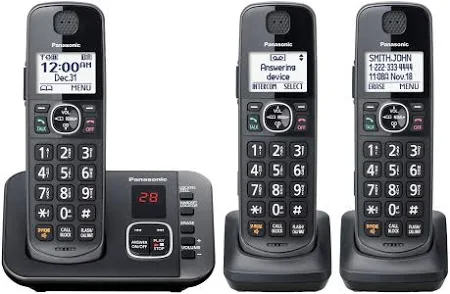
How to use Magic Jack with your house’s internal landline wiring
With cable internet
First, make sure your phone service box–the demarcation box aka D-mark/DMARC– outside your home is disconnected from the street like so (or here). Then, plug the Magic Jack device into your router, but plug the phone cable part directly into a phone jack. (This is easy IF your cable comes in close to a phone jack like ours was. Check that first.) Then, plug your landline phones into other phone jacks, or into the same jack the Magic Jack is plugged into using a $2 – $6 splitter. Check for dial tones and call from your landline as well as make a call to it from your cell to make sure it works.

With DSL internet
This one is trickier apparently, since your phone line is being used for DSL and can’t be unplugged from where it comes in from the street. There is a way around this, but I can’t vouch for it since it didn’t apply to me, and I don’t have a good video to explain this yet, but I will add one when I find it! (Post in the comments if you’ve been able to use DSL + internal phone wiring with Magic Jack!)
Filter spam calls
Add your new VOIP number to the donotcall.gov. The illegitimate spammers will still call you, so see what the Magic Jack service can do in terms of cutting that down. I think caller ID should work just fine if your handset supports it, but I don’t have one that does yet…
Complete Magic Jack setup online or in the app
Login to your Magic Jack account and peruse the other features of your account, including setting up voicemail and downloading the app so that you can check voicemail and see missed calls.
